
Connecting large language models (LLMs) to external software systems used to mean writing bespoke glue code for every AI platform. If a developer wanted an assistant to query a database, inspect logs, and trigger deployments across Claude, ChatGPT, and local IDE agents, each client required its own custom plugin schema, authentication wrapper, and execution loop.
The Model Context Protocol (MCP) eliminates that fragmentation. By defining an open, standardized client-server interface for AI integrations, MCP allows developers to build a single server exposing tools, structured resources, and domain workflows that any compatible AI client can discover and invoke.
In this guide, we break down how MCP works under the hood, examine transport and tool-discovery trade-offs, and walk through a production-grade implementation architecture using the open-source Home Assistant MCP (ha-mcp) server as a practical reference.
What Is the Model Context Protocol (MCP)?
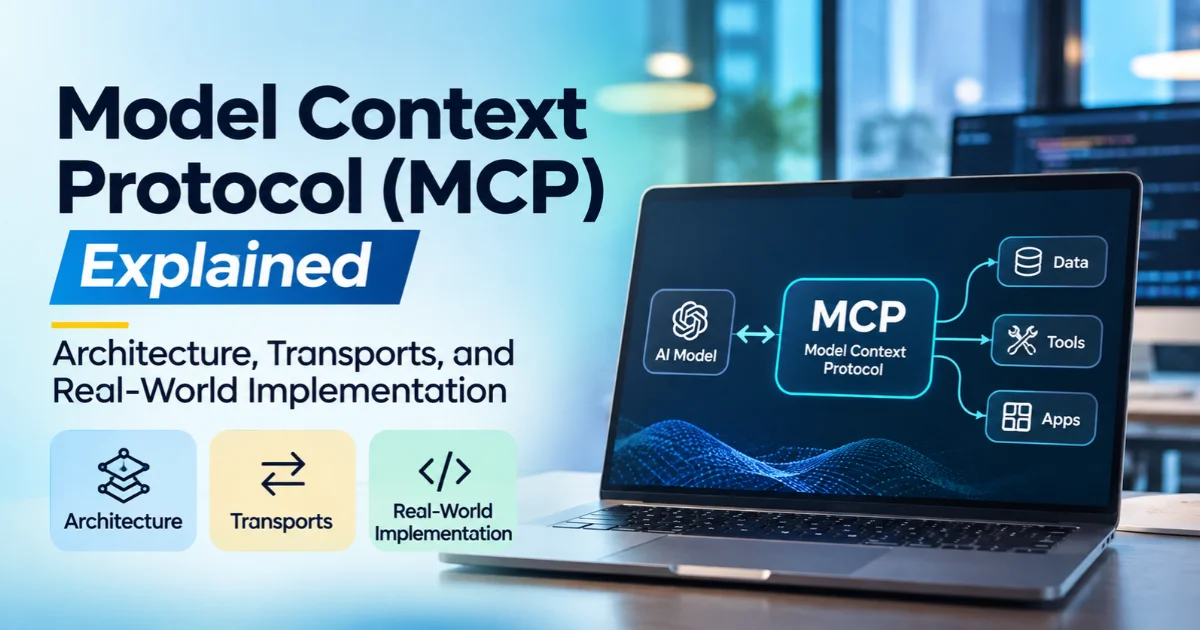
The Model Context Protocol (MCP) is an open standard that governs how AI applications (referred to as hosts or clients) communicate with external data sources, local environments, and APIs (exposed by MCP servers).
Plaintext
+-------------------------------------------------------------------+
|                        MCP Host / Client                          |
|   (Claude Desktop, Claude Code, ChatGPT, Cursor, VS Code, etc.)   |
+-------------------------------------------------------------------+
                 |                                 |
     Streamable HTTP / Webhooks               Local stdio
                 |                                 |
                 v                                 v
+---------------------------------+ +-------------------------------+
|      Remote / In-Process MCP    | |        Local MCP Server       |
|        Server (e.g., ha-mcp)    | |      (Subprocess via uvx)     |
+---------------------------------+ +-------------------------------+
                 |                                 |
                 v                                 v
+-------------------------------------------------------------------+
|        Underlying APIs, Databases, Filesystems & Devices          |
+-------------------------------------------------------------------+
Rather than embedding hardcoded API integrations directly inside an LLM wrapper, MCP decouples the model interface from the execution backend:
- MCP Clients manage the conversation loop, prompt assembly, user permission prompts, and LLM inference calls.
- MCP Servers act as lightweight capability providers that advertise available functions, read-only context URIs, and safety metadata over a uniform JSON-RPC protocol.
For software developers, MCP functions much like the Language Server Protocol (LSP) did for code editors: write one compliant server, and it works across more than a dozen AI clients without rewriting tool definitions.
How Does MCP Work?
At runtime, an MCP session follows a structured lifecycle: capability negotiation, discovery, and tool or resource execution.
- Core MCP Primitives An MCP server exposes capabilities through three primary primitives:
- Tools (tools/list and tools/call): Executable functions defined with JSON Schema input parameters and behavioral annotations (such as readOnlyHint). When an LLM decides an action is needed, the client dispatches a tools/call request to the server and feeds the structured output back into the model’s context window.
- Resources (URI-addressed context): Read-only documents or reference guides exposed via structured URIs (for example, skill:// URIs). Unlike system prompts that consume tokens on every turn, MCP resources are discovered via metadata listings and fetched only when a client explicitly requests them.
- Prompts: Pre-defined workflow templates that help users trigger repeatable multi-step tasks from their client interface.
- Transport Layers: Streamable HTTP vs. Stdio MCP supports two primary transport mechanisms, and choosing the right one significantly affects reliability:
- Streamable HTTP: The server runs as an independent HTTP service (locally on a port, inside an application process, or behind a reverse proxy/webhook). Clients connect via a URL. Streamable HTTP supports remote access, multiple concurrent clients, OAuth/OIDC authentication, and per-endpoint routing rules.
- Standard Input/Output (stdio): The MCP client spawns the server locally as a child subprocess and communicates over standard input/output streams. While convenient for quick local demos, stdio ties the server lifecycle to a single desktop client, cannot easily serve remote devices, and is prone to connection hangs if duplicate server entries are misconfigured.
For production deployments, Streamable HTTP is the preferred transport architecture.
Key Features of a Production MCP Server: Inside ha-mcp
To see how these protocol concepts translate into real engineering decisions, it helps to examine Home Assistant MCP (ha-mcp, v9.0.0+) an open-source MCP server designed to let AI assistants configure, automate, and debug Home Assistant instances.
While Home Assistant includes a minimal built-in MCP integration scoped strictly to voice-exposed Assist entities, ha-mcp demonstrates what a full-featured developer MCP server looks like, exposing roughly 87 specialized tools across automation authoring, dashboard management, log inspection, and system backups.
- Dynamic Tool Discovery and Context Optimization
A major architectural challenge in MCP design is tool catalog bloat. Passing 80 to 100 full JSON tool schemas into an LLM’s context window on every turn consumes thousands of tokens and degrades tool-selection accuracy particularly on smaller open-weight models (such as local Ollama deployments) or clients that inline all tool schemas upfront.
Modern clients like Claude Desktop and Claude Code mitigate this with native deferred tool loading, pulling schemas into context only on demand. For models and clients that lack deferred loading (such as smaller local models, Gemini, or CLI tools that inline full catalogs), ha-mcp implements a BM25 keyword search transform built on FastMCP:
- When search-based discovery is enabled (ENABLE_TOOL_SEARCH=true), the server hides the full 87-tool catalog behind a compact search tool (ha_search_tools) alongside a small set of pinned tools (ha_search, ha_get_overview).
- When the model queries ha_search_tools, the server returns compact definitions and routes execution through permission-segregated proxy tools:
- ha_call_read_tool (safe read operations that clients can auto-approve)
- ha_call_write_tool (state-mutating operations)
- ha_call_delete_tool (destructive removal operations)
This proxy split allows MCP clients to enforce granular human-in-the-loop approval policies without parsing individual tool docstrings.
- Per-URL Catalog and Read-Only Routing
When multiple AI agents share a single MCP server, different clients often need different capability boundaries. Rather than running separate server processes, ha-mcp uses URL path suffixes to customize behavior per connection:
- Full catalog endpoint: https://example.com/private_secret/catalog/full
- Search-based discovery endpoint: https://example.com/private_secret/catalog/search
- Read-only isolation endpoint: https://example.com/private_secret/readonly
- Combined read-only + search endpoint: https://example.com/private_secret/readonly/catalog/search
Appending /readonly hides write tools and blocks mutation calls at the server routing layer useful when granting automated background agents safe observability into a live system.
- Domain Guidance via Bundled skill://
Resources Exposing raw API tools does not automatically teach an LLM architectural best practices. Without domain guidance, an agent creating smart home automations might write fragile Jinja2 templates instead of using native platform triggers.
To solve this, ha-mcp bundles domain best practices as MCP resources served over skill:// URIs. Clients that support MCP resources can inspect and load these guides on demand, while tool-only clients can invoke a fallback tool (ha_get_skill_guide) to retrieve the markdown instructions only when needed keeping idle token overhead near zero.
How Developers Can Use and Deploy MCP Servers
Depending on your infrastructure constraints, MCP servers typically follow one of three deployment topologies:
| Deployment Pattern | Execution Model | Best Suited For | Authentication Approach |
| In-Process Integration | Runs directly inside the host application runtime | Single-node deployments with full feature parity | Built-in session auth or secret webhook URLs |
| Standalone Container / Process | Runs via Docker or Python (uvx) over Streamable HTTP | Multi-client setups, separate compute hosts, custom reverse proxies | Bearer tokens, secret URLs, or OIDC providers |
| Local stdio Subprocess | Spawned directly by a desktop IDE or CLI client | Local prototyping and sandboxed testing | Local environment variables (HOMEASSISTANT_TOKEN) |
Important Configuration Rule: Always configure one transport method per MCP server in a given client. Pointing a single client at both a local stdio entry and a remote HTTP URL for the same server is a frequent cause of client-side connection hangs and duplicate tool collisions.
Step-by-Step Implementation and Configuration Examples
The following workflow outlines how developers deploy ha-mcp (v9.0.0+, released October 2026) over Streamable HTTP and wire it into an MCP client.
Step 1: Deploy the Server via Docker (Streamable HTTP)
If you prefer running the MCP server independently from the target application host, you can launch the official container image in HTTP mode using Docker:
Bash
docker run -d \
  --name ha-mcp \
  -p 9584:9584 \
  -e HOMEASSISTANT_URL="http://192.168.1.50:8123" \
  -e HOMEASSISTANT_TOKEN="your_dedicated_service_account_token" \
  -e ENABLE_TOOL_SEARCH="true" \
  -e TOOL_SEARCH_MAX_RESULTS="5" \
  ghcr.io/homeassistant-ai/ha-mcp:latest
What these flags configure:
- HOMEASSISTANT_URL & HOMEASSISTANT_TOKEN: Connects the MCP server to the target instance. Creating a dedicated administrator service account (rather than reusing a personal login token) isolates audit trails and simplifies token rotation.
- ENABLE_TOOL_SEARCH=”true”: Activates BM25 on-demand tool discovery so smaller models or non-deferred clients are not overwhelmed by all 87 tool schemas.
- TOOL_SEARCH_MAX_RESULTS=”5″: Caps the number of hidden tools returned per search query.
(Alternatively, on Home Assistant 2026.8+ or the 2026.11+ built-in Marketplace, developers can install the HA-MCP integration directly to run the exact same server in-process without managing separate containers.)
Step 2: Run Directly with uvx (Python 3.14)
For Python-centric workflows without Docker, uvx executes the published PyPI package directly in an isolated environment:
Bash
HOMEASSISTANT_URL="http://192.168.1.50:8123" \
HOMEASSISTANT_TOKEN="your_dedicated_service_account_token" \
uvx --python 3.14 ha-mcp@latest
Step 3: Connect an MCP Client Over Streamable HTTP
Once the HTTP server or webhook endpoint is running, register the endpoint URL in your MCP client configuration (such as Claude Desktop, Claude Code, VS Code, or Cursor).
JSON
{
  "mcpServers": {
    "home-assistant": {
      "type": "streamable-http",
      "url": "https://your-domain.example/api/webhook/mcp_secret_id/catalog/search"
    }
  }
}
If you are connecting an automated monitoring agent that should never modify system state, swap the URL suffix to /readonly/catalog/search to enforce read-only access at the protocol endpoint.
Step 4: Refresh the Client Tool Cache After Config Changes
MCP clients cache the output of tools/list for the duration of a session. Whenever you toggle server flags such as switching ENABLE_TOOL_SEARCH, modifying pinned tools, or enabling Read Only Mode restarting the backend server alone will not update the AI client. You must explicitly refresh or reconnect the MCP connector inside your client UI and start a new conversation, so it fetches the updated schema list.
Real-World Developer Applications
Beyond smart home automation, the architectural patterns demonstrated in ha-mcp apply directly to broader software engineering workflows:
- Automated Infrastructure Debugging: Instead of manually grepping logs, developers connect an MCP-enabled CLI (such as Claude Code) to read execution traces (ha_get_automation_traces), inspect system health, and propose targeted fixes grounded in real runtime telemetry.
- Safe Configuration Refactoring with Automated Rollbacks: When AI agents modify structured files or YAML configurations, ha-mcp separates privileged filesystem operations (ha_config_set_yaml, ha_write_file) behind explicit opt-in feature flags (ENABLE_BETA_FEATURES) and captures automatic pre-edit snapshots with secret scrubbing before applying changes.
- Multi-Model Development Environments: Engineering teams can expose a single MCP backend to multiple interfaces simultaneously giving frontier coding agents full tool access via /catalog/full while routing lightweight local models through /catalog/search to stay within tight context limits.
Benefits and Limitations Benefits
- Write Once, Connect Everywhere: A single MCP server integrates seamlessly across desktop apps, terminal coding agents, web interfaces, and IDE extensions.
- Structured Safety Boundaries: Tool annotations (readOnlyHint), proxy separation (read vs. write vs. delete), and /readonly URL routing give developers deterministic control over what an LLM can mutate.
- On-Demand Context Efficiency: Using MCP resources (skill://) and BM25 tool search keeps baseline token consumption low even as server capabilities scale to dozens of tools.
Limitations
- Client Feature Inconsistency: MCP capabilities vary across hosts. Some clients support deferred tool loading and skill:// resources natively, while others inline every tool schema upfront or cap total tools at 100.
- Schema Maintenance Overhead: Every tool exposed by an MCP server requires clear docstrings, strict parameter types, and accurate annotations; vague descriptions lead to malformed LLM tool calls.
- Not a Replacement for Domain Logic: An MCP server provides execution primitives, not architectural judgment without bundled skills or clear prompt instructions, models can still choose suboptimal workflows.
Technical Challenges and Considerations
When building or deploying MCP servers in production environments, engineers must account for three operational challenges:
- Firewall Traversal and Remote Authentication: Cloud-hosted AI connectors (such as ChatGPT connectors) typically require a publicly reachable HTTPS endpoint. When hosting services behind a private NAT or firewall without port forwarding, developers must rely on reverse proxies, managed webhooks, OAuth/OIDC identity providers (like Keycloak or Authentik), or outbound-only tunnel clients.
- Privileged Filesystem Exposure: Granting an LLM direct read/write access to configuration files introduces prompt-injection and misconfiguration risks. Privileged tools should remain disabled by default behind master feature flags, restricted to explicit directory allowlists, and paired with automated pre-edit backups.
- State Coordination Across Concurrent Clients: If an AI agent is restoring a configuration snapshot while another human or automated client edits the same resource, race conditions can occur unless the MCP server implements serialized operation locks.
Frequently Asked Questions (FAQ)
- How is MCP different from standard REST APIs or OpenAI Function Calling? REST APIs define how software services talk to each other over HTTP, while function calling is a model-specific JSON format for invoking tools during inference. MCP sits between them as a standardized discovery and transport protocol, allowing any AI client to dynamically query what tools and resources a server offers without hardcoding client-side API wrappers.
- Why is Streamable HTTP recommended over stdio for MCP servers? While stdio works for quick single-user local scripts, it binds the server to one local subprocess, cannot serve remote or mobile clients, and is susceptible to transport hangs. Streamable HTTP runs as a standard network service, supports multiple concurrent clients, enables URL-based routing (/readonly), and works cleanly behind reverse proxies.
- How do developers prevent large MCP servers from exhausting an LLM’s context window? Developers can reduce idle token usage in two ways: using MCP clients that support native deferred tool loading, or enabling server-side search discovery (such as FastMCP’s BM25 tool search in ha-mcp), which replaces dozens of full JSON schemas with a compact search tool that fetches definitions only when relevant.
- Why do newly enabled MCP tools sometimes fail to appear in my AI client? Most MCP clients cache the server’s tools/list payload when a connection is initialized. After changing server permissions, read-only settings, or feature flags, you must trigger a manual tool refresh or reconnect the MCP server inside your client settings and open a new session.