
We once had a demo that looked perfect. Locally, responses came back in under two seconds. Smooth typing animation, clean UI, everything felt “production-ready.” Then we deployed it to our staging servers at TheAIAura.
Suddenly, users were staring at a blank screen for 6–8 seconds before anything appeared. Not an error—just silence. That’s worse; it feels broken.
We blamed the model first. We switched providers and ruthlessly tweaked prompts, but nothing changed. The real issue? Our retrieval pipeline was slow, our network hops were inefficient, and we were forcing everything through a single, sequential flow.
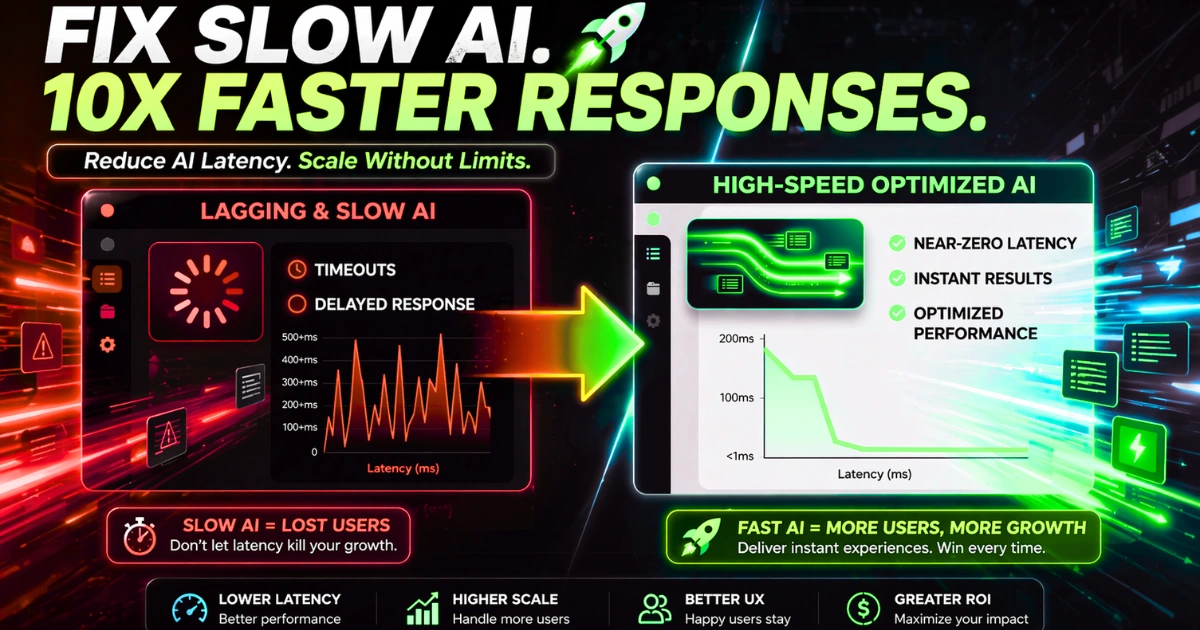
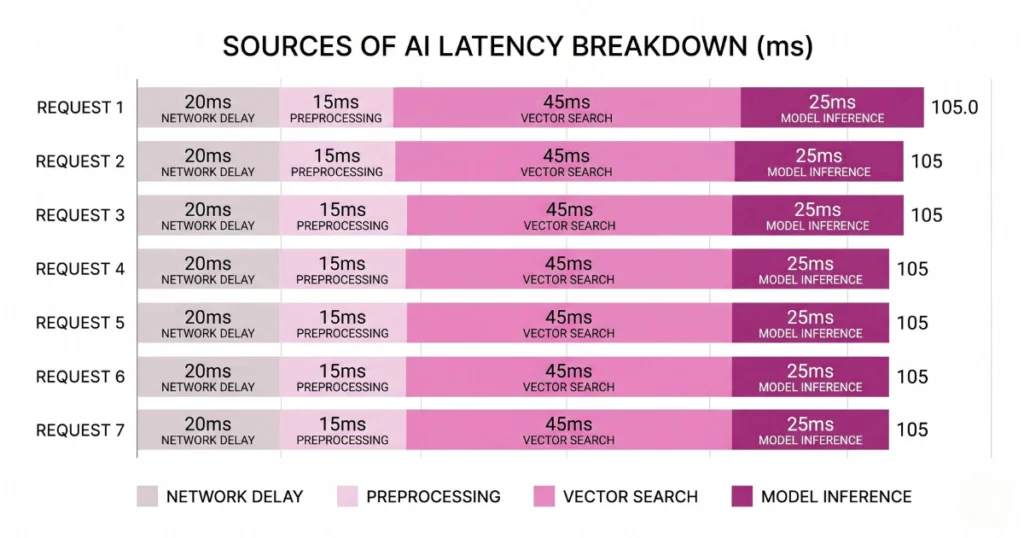
Latency in AI systems rarely comes from one place. It’s death by a thousand small delays.
To build scalable AI systems that don’t fail in production, you have to optimize the entire stack.
First, Measure the Right Thing (Most Teams Don’t)
A common mistake is tracking only total response time. That’s not how users experience your app. What actually matters are two specific metrics:
Time to First Token (TTFT): When the first word appears on the screen.
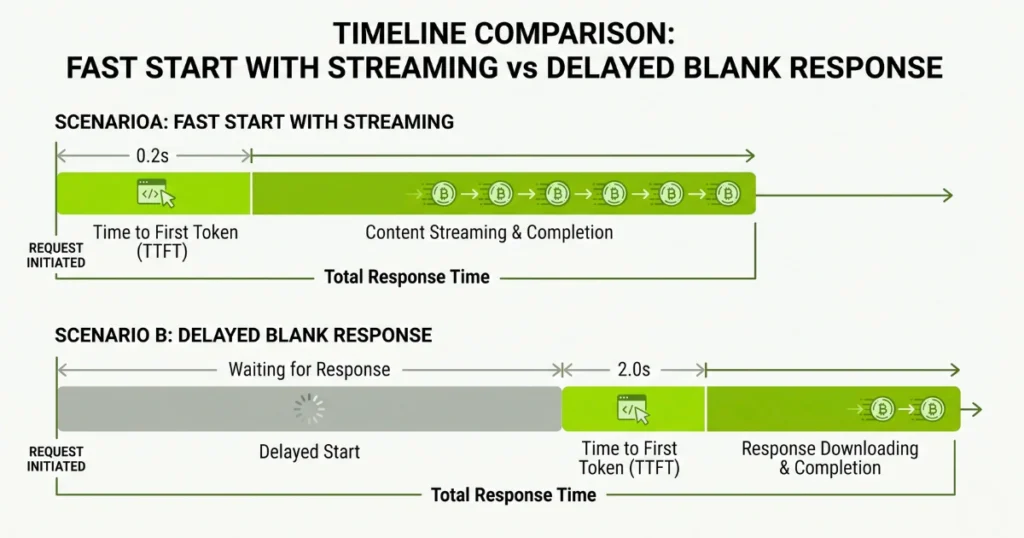
Time Per Output Token (TPOT): How fast the rest of the text streams.
If your app takes 8 seconds total but starts responding in 500ms, users are fine. If nothing shows for 3 seconds, they assume it’s broken. As a practical rule, if TTFT exceeds ~800ms, users feel lag. Fix your TTFT first. Always.
To understand how pipeline bottlenecks stack up to create terrible UX, adjust the parameters in the latency calculator below.Show me the visualization
The Hidden Bottleneck: Your Infrastructure
Most latency problems have nothing to do with the model. They come from everything around it. Common culprits include slow vector database queries, multiple API hops across regions, and cold starts in serverless functions.
We once found 1.2 seconds lost just in DNS resolution, TLS handshakes, and cross-region routing. That delay happened before the model even started thinking.
What actually helps is keeping services in the same geographic region and reusing persistent connections. You’re not optimizing AI—you’re optimizing plumbing.
Semantic Caching: The Instant Speed Boost
Not every question needs fresh computation. A large percentage of user queries are variations of the exact same thing. Instead of recomputing, detect the similarity and return a cached answer.
The Caching Impact: Response time drops to milliseconds. Zero model calls are made, and zero tokens are billed. It’s one of the few optimizations that drastically improves speed while helping youreduce AI API costs.
Embed the incoming query, compare it with stored queries, and if it crosses a similarity threshold, serve the cache.
Streaming: Stop Waiting for the Full Response
One of the worst UX mistakes is waiting for the entire response before sending anything. Users don’t need the full answer immediately; they just need confirmation that something is happening.
Implement streaming via Server-Sent Events (SSE) or WebSockets. Start streaming and rendering text exactly as it generates. Even if the total compute time is the same, the perceived speed improves massively.
Model Routing: Not Every Task Needs a Heavy Model
This is a quiet latency killer. Large models are inherently slower, yet many development teams send every single prompt to them.
Extracting a date is not deep reasoning. Summarizing standard text is not complex analysis. Implement a routing layer that classifies query complexity.
Send simple tasks to smaller, rapid models and reserve complex tasks for the heavyweights. Understanding specialized vs. generalist AI is crucial for building a responsive orchestration layer.
Your RAG Pipeline Is Probably Slower Than You Think
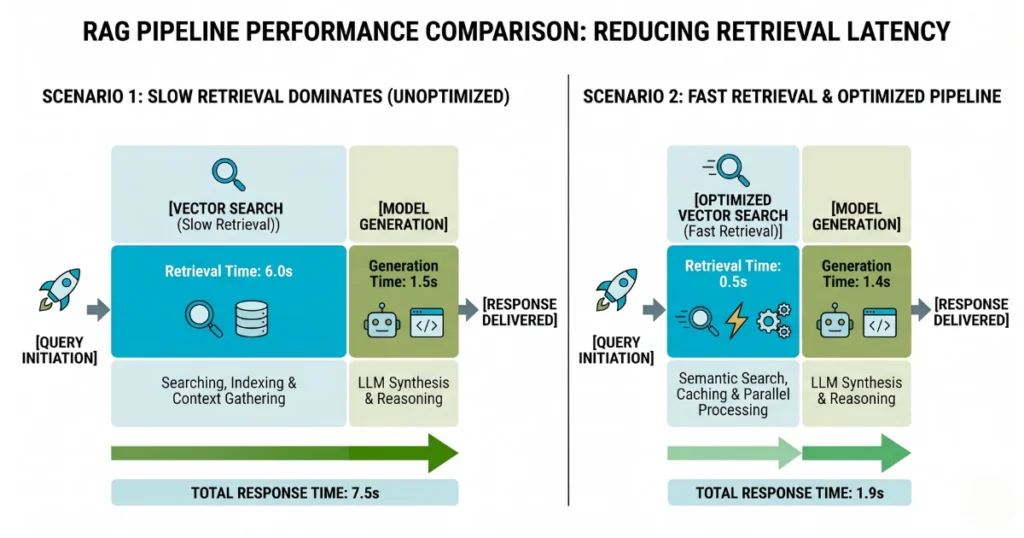
If you’re using retrieval, chances are this is where your delay lives. Typically, vector search takes too long, forcing the model and the user to wait.
We’ve seen cases where retrieval takes 1.5 seconds while generation takes only 1 second. Meaning the “AI” wasn’t slow—the database was. For a deeper dive into structuring this correctly, review what RAG is in AI and how to optimize it.
Fixes that actually work:
- Reduce the search space by filtering metadata before searching.
- Limit results to the top 2–3 chunks only.
- Tune your index for speed, not mathematical perfection.
Perfect recall doesn’t matter if users leave before seeing the answer.
Parallelize Wherever Possible
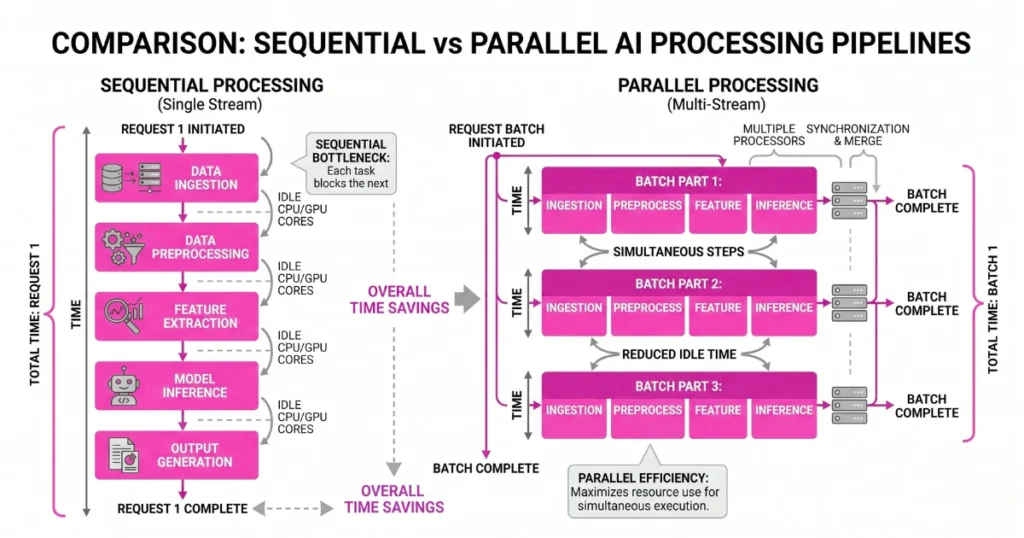
A lot of pipelines are unnecessarily sequential. Processing input, running safety checks, fetching data, and calling the model happen one after the other. Each step waits for the previous one.
Instead, overlap operations. Run safety checks while fetching data. Prepare your API connection early. Small overlaps equal big cumulative gains. If you are chaining logic, building reliable AI agents requires minimizing how often one agent idly waits for another.
Reduce Context Size (This One Hurts, But Works)
Large context windows are tempting. They feel safe because “more data equals a better answer.” In reality, they slow everything down, increase costs, and often reduce output accuracy.
Aggressively trim context. Send only the most relevant chunks and eliminate redundancy. As we’ve noted before regarding the token trap and unlimited context, giving the model a massive document doesn’t help it; you’re just making it work harder.
If You Self-Host: Go Lower-Level
If you’re running your own open-source models, you have more control and more responsibility. Two low-level interventions matter immensely:
- Quantization: Reduces model weight precision (e.g., INT8), which speeds up inference and lowers memory usage.
- Speculative Decoding: A small “draft” model predicts the next tokens, and the large model verifies them in parallel.
This setup can significantly improve generation speed without sacrificing output quality.
Common Mistakes That Keep Apps Slow
These pitfalls come up again and again in development cycles:
- Assuming the LLM itself is the bottleneck.
- Overloading context windows with unfiltered data.
- Chaining too many agent steps in sequence.
- Building overly complex orchestration layers that fracture the data flow.
One painful truth: architectural complexity almost always increases latency.
Final Thought: Speed Is an Architecture Problem
You can’t reduce AI latency just by tweaking a prompt. You fix it by reducing unnecessary work, parallelizing what remains, and eliminating bottlenecks across your entire stack.
The fastest AI systems aren’t the ones with the best models. They’re the ones that send less data, make fewer API calls, and start typing before the user gets impatient.
FAQs
- What is the biggest cause of AI latency?
Usually, it is not the model. The primary culprits are slow retrieval pipelines, unoptimized network delays, and sequential infrastructure architecture. - What matters more: total response time or first response?
Time to First Token (TTFT). Users care far more about when the response starts than when it finishes. - Does a bigger context window increase latency?
Yes. More tokens require more computational attention, resulting in slower inference and higher costs. - How can I instantly improve perceived speed?
Implement streaming. Even without reducing total backend time, streaming tokens as they generate makes your app feel instantaneous to the end user.