
If you’ve ever built a quick AI app using an API, you know the thrill. A few lines of Python, a single API call, and suddenly, you have a working chatbot. It feels like magic.
But what happens when you try to scale that “wrapper” to hundreds or thousands of users? Things break. Latency spikes, API costs skyrocket, and the AI’s responses become wildly inconsistent.
That is where most basic AI tutorials stop—and where real software engineering begins. In 2026, we are moving past simple “AI wrappers” into an era of AI-first systems, where the Large Language Model (LLM) is the core engine, not just a gimmick.
If you want to transition from casual prompt engineering to building robust, real-world AI systems, this guide will walk you through exactly what matters: memory, cost control, orchestration, and avoiding catastrophic production failures.
Why AI Models Don’t Actually “Think” (And Why It Matters)
To build reliable AI applications, you have to accept one uncomfortable truth: AI models do not think. They are highly advanced probability engines designed to predict the next most likely token based on your input. Once you accept this mathematical reality, your entire engineering approach changes. You stop expecting human-like intelligence and start designing rigorous systems that logically guide the model toward the correct outputs.
The “More Context is Better” Myth
A massive mistake developers make when scaling AI apps is assuming that feeding the model more data will yield better results. In practice, dumping massive context often ruins the output.
Developers often upload entire knowledge bases into a prompt, expecting the AI to cleanly extract a single answer. Instead, the model gets distracted by irrelevant data. This leads directly to:
- Frequent AI hallucinations
- Broken output formatting
- Completely irrelevant answers
Key Takeaway: More context equals more noise. The best AI systems provide focused, highly relevant information only when the model actually needs it.
RAG vs. Fine-Tuning: Which Should You Use?
Choosing between Retrieval-Augmented Generation (RAG) and Fine-Tuning is one of the most critical architectural decisions you will make. Here is a quick breakdown to help you decide:
| Approach | How It Works | Best Used For |
|---|---|---|
| Advanced RAG | The AI retrieves relevant, external data from a database before generating an answer. | Dynamic, real-time, frequently changing, or private user data. |
| Fine-Tuning | The model is pre-trained on specific examples to permanently alter its default behavior. | Consistent brand tone, repeating structured outputs, and stable use cases. |
Quick Decision Guide
- Choose RAG if: Your data updates constantly, you need real-time accuracy, or you are handling private/user-specific documents.
- Choose Fine-Tuning if: You need a highly specific tone of voice, you rely on strict output formats, and your use case rarely changes.
Overcoming the “Token Trap”: Production-Ready RAG Architecture
When you move an AI app to production, memory and token limits become your biggest bottleneck, often leading developers right into the token trap. A naive RAG setup works flawlessly in a demo but fails in the real world because real users ask messy, unstructured questions.
To make RAG work at scale, you need a multi-layered architecture:
- Query Rewriting & Routing: Users rarely ask perfect questions. Use a faster, lightweight LLM to interpret the user’s intent, clean up the query, and route it to the correct internal database.
- Hybrid Search Integration: Don’t rely on just one search method. Combine Semantic Search (which finds meaning-based results) with Keyword Search (exact phrase matching). This prevents your app from failing on edge cases like specific product SKUs or industry acronyms.
- The Re-Ranking Layer (Crucial): After retrieving dozens of potential results, do not send them all to your main LLM. Score and rank them first, passing only the top 2–3 most relevant snippets. This drastically reduces API costs and boosts accuracy.
AI Orchestration: The Hidden Danger of Plain Text
As your AI application grows, you will inevitably need multi-step workflows and patterns for building AI agents that actually work when communicating with each other.
Here is a massive red flag: Letting AI systems communicate using plain text. If Agent A sends a plain text paragraph to Agent B, even a minor formatting hallucination can crash your entire pipeline.
The Fix: Enforce Structured Outputs Always force your models to communicate in strict data formats like JSON.
- Use schema validation libraries (like Pydantic in Python).
- Validate every single output before it moves to the next step.
- Automatically reject and retry invalid formats.
Multimodal AI: The 2026 Standard
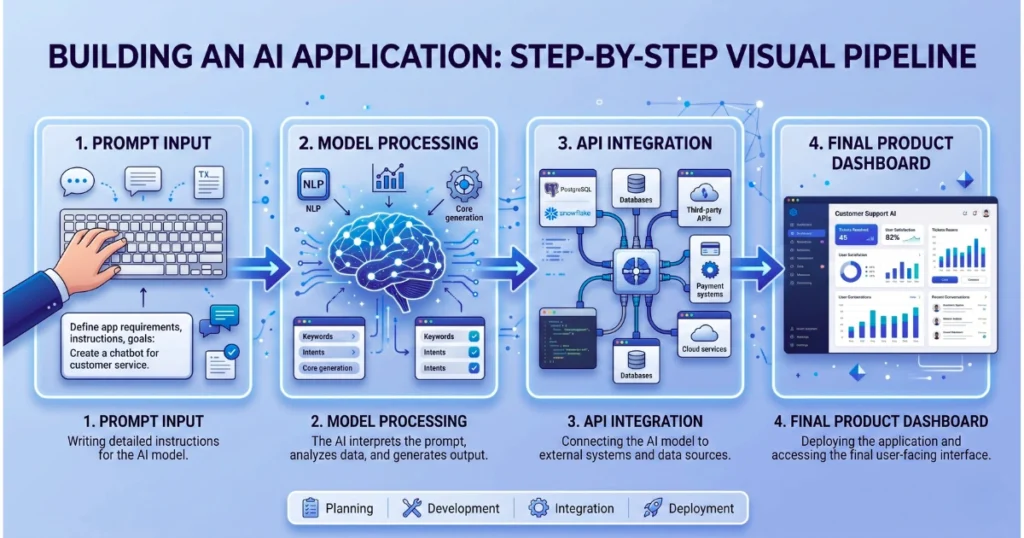
Most older tutorials focus strictly on text-in, text-out. But real-world applications in 2026 are heavily multimodal. Modern systems seamlessly merge text, image, video, and voice.
Imagine an app where a user uploads a PDF, the AI analyzes the visual charts inside it, and then the user interacts with the results via voice commands. That is the current industry standard.
The Business Impact of AI Architecture
This shift completely changes Software-as-a-Service (SaaS) pricing models. Traditional SaaS relies on flat per-user pricing. However, AI apps require compute-based pricing and usage-based tiers. Your engineering architecture directly dictates your profit margins.
LLM FinOps: Avoiding API Cost Disasters
One of the most terrifying risks of production AI is uncontrolled billing—often an unexpected realization of the hidden cost of AI in business.
The Nightmare Scenario: A developer builds an autonomous AI coding agent meant to write code, test it, and rewrite it if it fails. Without strict limits, the agent hits an unsolvable bug and loops infinitely. The result? A massive API bill overnight.
Practical FinOps Fixes:
- Set Hard Iteration Limits: Never let an agent loop infinitely. Max out retries at 3 or 5.
- Build Fallback Conditions: If the AI fails, gracefully degrade to a standard error message or human handoff.
- Aggressive Caching: If 100 users ask the exact same question, you should only pay the API cost once.
Common Mistakes That Kill AI Apps in Production
Avoid these rookie errors when scaling your application:
- Using massive, expensive models (like GPT-4/Claude 3.5 Sonnet) for simple routing tasks.
- Failing to set limits on autonomous agent loops.
- Operating without a caching database.
- Letting AI agents pass unstructured text to each other.
- Ignoring latency issues until users start abandoning the app.
How to Evaluate AI and Handle “Model Drift”
Traditional unit testing (checking if 1 + 1 = 2) does not work with AI, because generative outputs change slightly every time.
Instead, implement LLM-as-a-judge systems. This is where you use a separate, highly capable AI to evaluate the outputs of your main system based on correctness, structure, and tone.
Furthermore, AI models suffer from “drift” as they are updated by providers. To ensure long-term stability:
- Keep your system logic completely separate from your prompts.
- Make your AI models easily replaceable (provider agnostic).
- Avoid tightly coupling your app to one specific model version.
Conclusion: Becoming an AI Engineer
Building AI applications is no longer just about writing clever prompts. It is about designing resilient software systems and learning how to architect scalable AI systems that don’t collapse in production.
Start simple. Build a clean routing layer, enforce JSON outputs, and add complexity only when necessary. Before you launch, ask yourself: “Would this system survive a 10x spike in usage and API costs?”
In 2026, the difference between a fun prototype and a profitable product isn’t the AI model you use—it’s the engineering system you build around it.
Frequently Asked Questions (FAQs)
- What is the biggest challenge in scaling AI applications?
The primary challenges are managing API costs, reducing latency, handling token/memory limits, and maintaining reliable, hallucination-free outputs at scale. - Is RAG always better than Fine-Tuning? No. RAG is the best choice for dynamic, real-time, or private data. Fine-tuning is better when you need the model to maintain a highly specific tone of voice or consistently output a strict format.
- How can I permanently reduce my AI API costs? Implement an aggressive caching layer, use smaller and cheaper models for simple tasks (like query routing), and place strict iteration limits on autonomous AI agents to prevent infinite billing loops.
- Do all AI applications need autonomous agents? No. You should always start simple with linear, predictable prompts. Only introduce multi-step AI agents when complex, multi-reasoning tasks are strictly required by the user.